anti-afk
9/26/2025|10 views

Mobile
Reactions
Description
- adsa
Features
- +аритмия
- + сильная усталость
- + лимфоузел
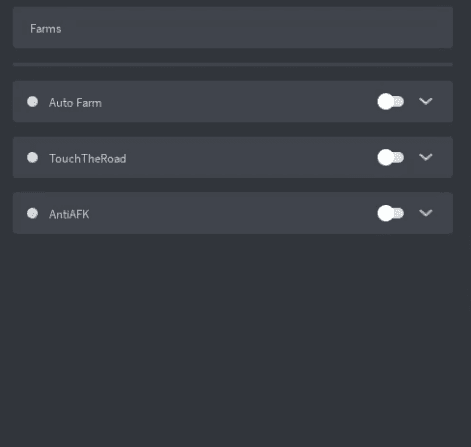
- +AutoFarm
- +Esp
- +Fly
- +Noclip
Script
-- Anti-AFK Script for Roblox "Steal a Brainroat"
-- Автоматически двигает персонажа чтобы избежать отключения за бездействие

local Players = game:GetService("Players")
local RunService = game:GetService("RunService")
local UserInputService = game:GetService("UserInputService")

local player = Players.LocalPlayer
local character = player.CharacterAdded:Wait()
local humanoid = character:WaitForChild("Humanoid")

local antiAFKEnabled = true
local movementInterval = 30 -- секунды между движениями
local lastMovementTime = tick()

-- Функция для случайного движения
local function performAntiAFKMovement()
    if not antiAFKEnabled or not character or not humanoid then
        return
    end

    -- Случайное направление движения
    local randomDirection = Vector3.new(
        math.random(-1, 1),
        0,
        math.random(-1, 1)
    ).Unit

    -- Движение в течение 1-2 секунд
    humanoid:MoveTo(character.HumanoidRootPart.Position + randomDirection * 5)

    -- Небольшая пауза перед возвратом
    wait(1.5)

    -- Возврат к исходной позиции (если персонаж еще жив)
    if humanoid.Health > 0 then
        humanoid:MoveTo(character.HumanoidRootPart.Position)
    end
end

-- Основной цикл анти-AFK
local antiAFKConnection
antiAFKConnection = RunService.Heartbeat:Connect(function()
    if not antiAFKEnabled then
        antiAFKConnection:Disconnect()
        return
    end

    local currentTime = tick()
    if currentTime - lastMovementTime >= movementInterval then
        performAntiAFKMovement()
        lastMovementTime = currentTime
    end
end)

-- Автоматическое переподключение при смерти персонажа
player.CharacterAdded:Connect(function(newCharacter)
    character = newCharacter
    humanoid = character:WaitForChild("Humanoid")

    -- Небольшая задержка после возрождения
    wait(3)
end)

-- GUI для управления анти-AFK
local function createGUI()
    local screenGui = Instance.new("ScreenGui")
    screenGui.Name = "AntiAFKGUI"
    screenGui.Parent = player.PlayerGui

    local frame = Instance.new("Frame")
    frame.Size = UDim2.new(0, 200, 0, 100)
    frame.Position = UDim2.new(0, 10, 0, 10)
    frame.BackgroundColor3 = Color3.fromRGB(40, 40, 40)
    frame.BorderSizePixel = 0
    frame.Parent = screenGui

    local corner = Instance.new("UICorner")
    corner.CornerRadius = UDim.new(0, 8)
    corner.Parent = frame

    local statusLabel = Instance.new("TextLabel")
    statusLabel.Size = UDim2.new(1, 0, 0, 30)
    statusLabel.Position = UDim2.new(0, 0, 0, 0)
    statusLabel.BackgroundTransparency = 1
    statusLabel.Text = "Anti-AFK: ВКЛ"
    statusLabel.TextColor3 = Color3.fromRGB(0, 255, 0)
    statusLabel.TextSize = 14
    statusLabel.Font = Enum.Font.Gotham
    statusLabel.Parent = frame

    local toggleButton = Instance.new("TextButton")
    toggleButton.Size = UDim2.new(0.8, 0, 0, 30)
    toggleButton.Position = UDim2.new(0.1, 0, 0.4, 0)
    toggleButton.BackgroundColor3 = Color3.fromRGB(255, 60, 60)
    toggleButton.Text = "ВЫКЛ"
    toggleButton.TextColor3 = Color3.fromRGB(255, 255, 255)
    toggleButton.TextSize = 14
    toggleButton.Font = Enum.Font.Gotham
    toggleButton.Parent = frame

    local corner2 = Instance.new("UICorner")
    corner2.CornerRadius = UDim.new(0, 6)
    corner2.Parent = toggleButton

    toggleButton.MouseButton1Click:Connect(function()
        antiAFKEnabled = not antiAFKEnabled
        if antiAFKEnabled then
            statusLabel.Text = "Anti-AFK: ВКЛ"
            statusLabel.TextColor3 = Color3.fromRGB(0, 255, 0)
            toggleButton.Text = "ВЫКЛ"
            toggleButton.BackgroundColor3 = Color3.fromRGB(255, 60, 60)
        else
            statusLabel.Text = "Anti-AFK: ВЫКЛ"
            statusLabel.TextColor3 = Color3.fromRGB(255, 60, 60)
            toggleButton.Text = "ВКЛ"
            toggleButton.BackgroundColor3 = Color3.fromRGB(0, 255, 0)
        end
    end)

    -- Перетаскивание GUI
    local dragging = false
    local dragInput, dragStart, startPos

    frame.InputBegan:Connect(function(input)
        if input.UserInputType == Enum.UserInputType.MouseButton1 then
            dragging = true
            dragStart = input.Position
            startPos = frame.Position

            input.Changed:Connect(function()
                if input.UserInputState == Enum.UserInputState.End then
                    dragging = false
                end
            end)
        end
    end)

    frame.InputChanged:Connect(function(input)
        if input.UserInputType == Enum.UserInputType.MouseMovement then
            dragInput = input
        end
    end)

    UserInputService.InputChanged:Connect(function(input)
        if input == dragInput and dragging then
            local delta = input.Position - dragStart
            frame.Position = UDim2.new(startPos.X.Scale, startPos.X.Offset + delta.X,
                                      startPos.Y.Scale, startPos.Y.Offset + delta.Y)
        end
    end)
end

-- Создаем GUI с задержкой
wait(2)
if player.PlayerGui then
    createGUI()
end

print("Anti-AFK скрипт активирован для Steal a Brainroat!")
print("Интервал движения: " .. movementInterval .. " секунд")
Edited By: Unknown

![Steal an Egg Script | Ouroboros Hub [No Key]](/_next/image?url=https%3A%2F%2Fres.cloudinary.com%2Fdp9gxjumz%2Fimage%2Fupload%2Fv1786636803%2Ftzx8f0shlryqsbzwmq3j.png&w=3840&q=75)